Skip to content
LandPKS
  • Apps
    • LandPKS Soil ID
    • LandPKS Classic
  • Knowledge Hub
  • Data Portal
  • About
    • About LandPKS
    • Partner with Us
    • Beta Program
    • LandPKS Team
    • Contact Us
  • News
  • Help

Soil

To enter soil data, go to Site dashboard > Soil.

From the soil screen, input observations about the surface and at various depths, including:
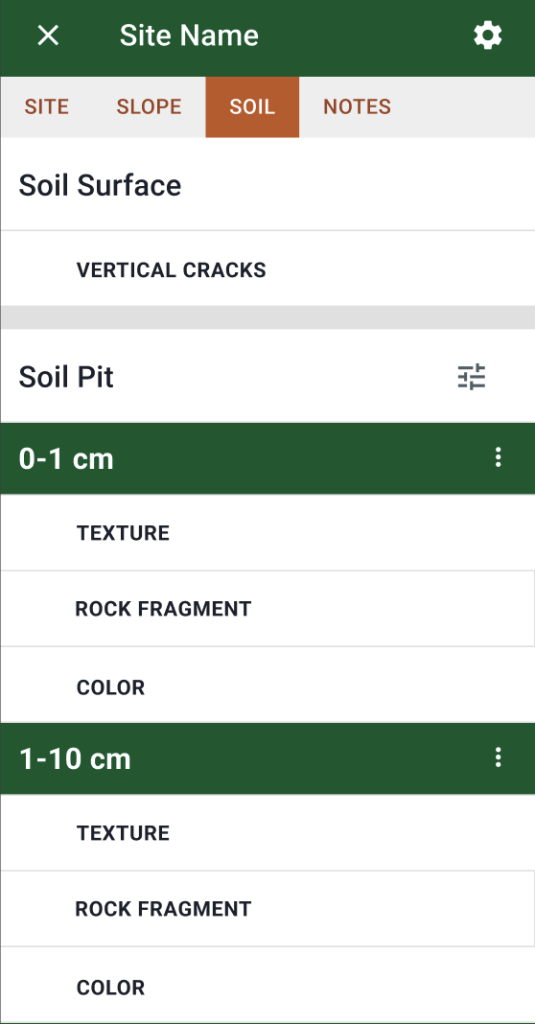
  • Cracking
  • Texture class and rock fragments
  • Color

  • Getting started with Soil ID
    • Creating an account and signing in
    • Using the map
    • Temporary pins
    • Soil ID and Ecological Site
  • Sites
    • Creating a site
    • Site dashboard
    • Notes
    • Deleting a site
  • Projects
    • Creating a project
    • Project inputs
    • Add sites to projects
    • Teams
    • “Something has changed” notice
  • Observations
    • Slope
      • Slope steepness
      • Slope shape
    • Soil
      • Soil tab
      • Soil cracks
      • Texture class and rock fragment volume
      • Color
  • General
    • Data privacy
    • Data export
      • Exporting data
      • Export CSV
      • Export JSON
    • Deleting an account
    • Changelog

Partner with us!

If your mission is to improve farmer livelihoods, advance evidence-based agricultural practice, promote data and digital equity, or support sustainable and regenerative land use, you're already thinking like a LandPKS partner. Dozens of organizations, from university researchers to government agencies to smallholder farmer networks, have helped shape LandPKS Soil ID into what it is today. Join us!
Learn more about partnering with LandPKS

Contact Us

General Inquiries Support
Terraso logo, link to terraso.org

© Copyright 2026 Terraso, a fiscally sponsored project of Inquiring Systems, Inc.
Privacy Policy and Terms of Service

Subscribe for News and Updates

Stay informed about LandPKS apps, including opportunities to provide input on features, and other news. Our newsletters are infrequent, and we will never sell or share your personal information.